For many software projects I build container images (Podman, Docker, OCI images), be it for my work, research projects, open source projects, or private purposes.
Most of these projects anyhow reside on GitHub, so I publish the images to the GitHub container registry as well.
In the past I had to pick the GitHub action steps together from snippets, and it was an iterative process of trial and error on its own.
So I decided to create one workflow-file to reuse it over and over again.
This allows me to:
reduce the setup time for new builds,
avoid making the same mistakes over and over again,
At the IIPC General Assembly & Web Archiving Conference (GA & WAC) I have presented a poster titled: “Linking the awesome: Building a Community Knowledge Graph for Web Archiving Resources” and had a talk on “Bridging the Web Archive and the Library: a Linked‑Data Model for FAIR Web Archive Integration” (the recordings are not yet online)
At some event we had a screen to show some slides, as well as a pre-produced video, to summarize our project outcomes.
Since my presentation tool-chain mostly involves LaTeX beamer slides, I came up with the following script to convert the PDF pages into video frames and concatenate another video file.
In git there is the command git cherry-pick that allows to “apply the changes introduced by some existing commits”.
This is nice if you want to reorder entire commits or things like that.
I often have the use case that I want to see individual files side-by-side to compare them or overwrite files with a previous version, your might have more precise use cases in mind.
At the beginning I thought git cherry-pick is the command I was looking for but I sound found out, it is not. So I went back, often to the GitHub web interface and just browsed the history and then the file tree to view the file at a certain state.
But since git has a very nice object storage I found out, that I can get any object with git show ${object_id} resp. git show --format=raw ${object_id}. An object can be a commit, a tree (directory), or a blob (file). So I needed to get the object id of the blob that I want to see. This can be done with git ls-tree command resp. to just get the specific id of the file I’m looking for: git ls-tree --object-only -r ${commit} ${file}.
#!/bin/sh## Done by Natanael 2023-01-31# see also: https://stackoverflow.com/a/42623347/414075commit=$1file=$2target_file=${3:-${file}.cherry}echo"Pick ${file} from commit ${commit}"file_id=$( git ls-tree --object-only-r${commit}${file})echo"It has the object id ${file_id}"
git show --format=raw ${file_id}>${target_file}echo"Written to ${target_file}"
Just make it executable and put it into your path, e.g. ~/.local/bin/git-cherry-file and call it with:
$ git-cherry-file HEAD~2 README.md
It will create a new file README.md.cherry. If you want to specify the target path you can add it as an additional argument, e.g. to overwrite the current file:
I was looking for a way to get an impression of the temporal development of my git repository.
So I chose to check for ways to animate the history of a git repository.
I found some DIY approach that should provide very nice results, but it requires some more effort.
Basically you iterate through all of your commits, execute a command to visualize this commit, what ever that means to you, and then merge all of these visualizations as frames together as a movie file.
The exect steps are here: http://eptcomic.com/ept1movie.htm.
Another tool is Gource (https://gource.io/).
It renders your repository in a 3D animation, that looks quite fancy.
A good startingpoint is:
$ apt install gource
$ gource -c 4.0 -s 1 -a 1 .
The major difference between the two tools and their results is, that with the first on you can visualize the content of the repository as it evolves, while the Gource mainly visualizes the file structure and the collaboration process on it.
From time to time it is important to create a backup of your data.
There are some tools that help one to copy files in some sophisticated ways onto a different medium.
I chose restic for this job.
But this only works well for the data you are working on, we call it user data, but not for your configuration.
Some backup articles suggest to just backup the complete users home directory which stores the user configuration, but this will not include the system configuration.
On top of this for me a backup is not a raw copy of the current system I’m working on, but just the actually relevant data and configuration.
This can also come along with an additional use case for a backup, that I want to use it to setup a clean new system where I only want to take over the data that I actually need.
So far I have not found any system, that covers the aspects mentioned, which leads me to the point that I’ve started to write down a concept for a configuration backup system.
You are welcome to send any hints and suggestions.
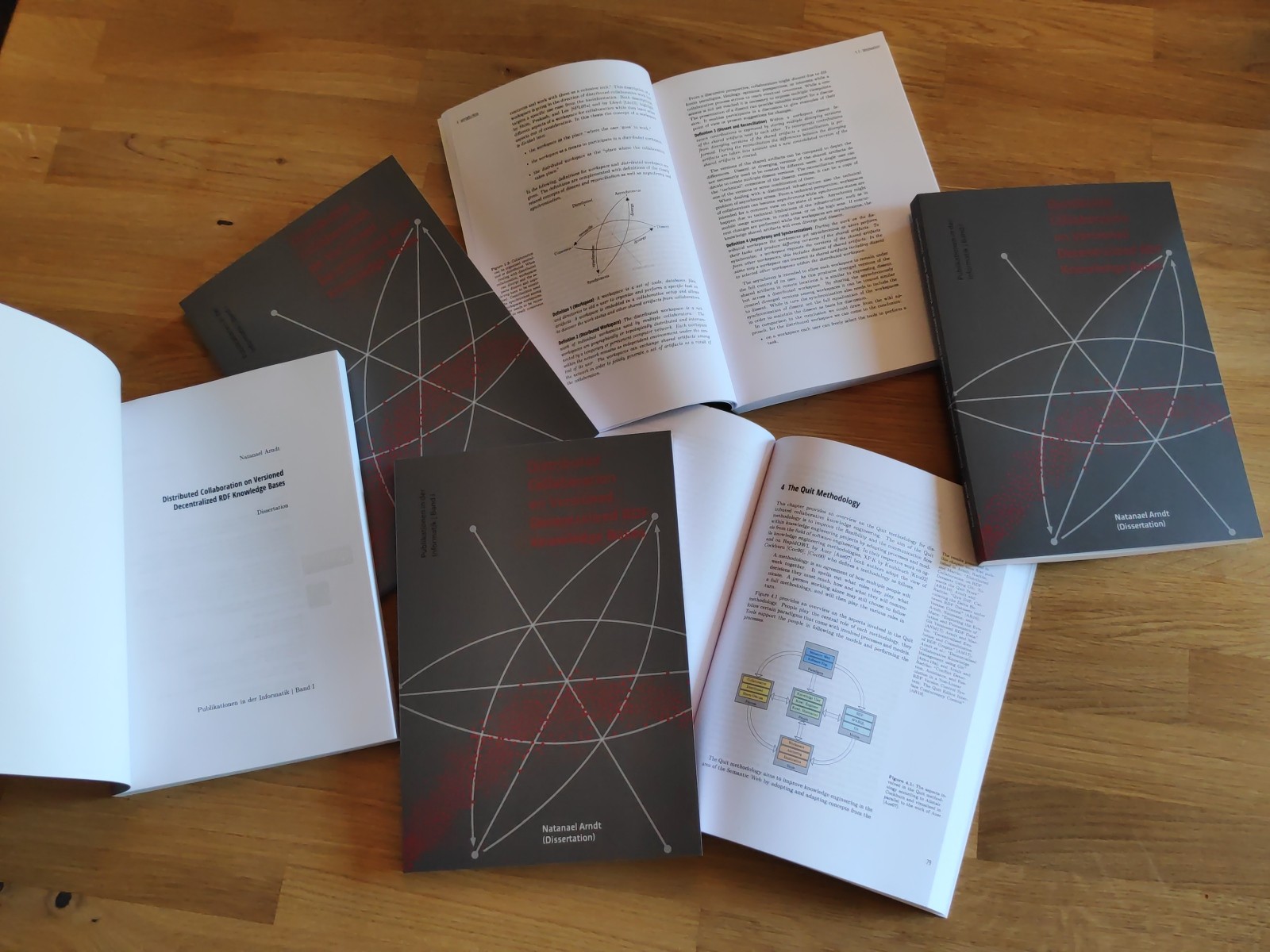
If you are looking for a good read for the holiday season or even a geeky present check this out. My dissertation “Distributed Collaboration on Versioned Decentralized RDF Knowledge Bases” is now published at the Open Access University Press Leipzig (Open-Access-Hochschulverlag Leipzig) which is situated at the Leipzig
University of Applied Sciences (HTWK Leipzig). It is available online as Open Access (DOI 10.33968/9783966270205-00) and at your favorite book shop (isbn: 978-3-96627-019-9).
If you are doing #SoftwareDevelopment resp. #SoftwareEngineering an looking for a #LaTeX/#TikZ version of a simple agile development #cycle check out my page ;-) https://natanael.arndt.xyz/notes/agile #SCRUM #agile
If you want to read my papers but you are to lazy to download them and open them with your favorite PDF reader you now get the service to read them all directly on my web page. Some as #HTML some as embedded #PDF. https://natanael.arndt.xyz/publications #OpenResearch #OpenAccess
Today I’ve released my #jekyllrdf Tutorial Screencast on Vimeo.
It teaches you all the basics necessary to create a simple Jekyll page from an RDF knowledgebase.
I hope that you enjoy it and that it is helpful for you!
Bitcoin.de as some other pages is using a One-Time-Pad (OTP) as two-factor authentication method, actually it is a Time-based One-Time Password algorithm (TOTP).
The Passwords are generated based on a shared secret as specified in RFC6238.
When activating the two-factor authentication on bitcoin.de the page shows a QR code which is used by OTP apps, such as andOTP (github), Google Authenticator, or OTP Authenticator (github), to transfer the shared secret to the phone. Additionally the page shows the shared secret as a string of letters and numbers, which one should write down and deposit in a safe place.
But what happens, if due to some circumstances you have to bring this shared secret back into the app?
Today we’ve released #jekyllrdf 2.3.0 at rubygems https://rubygems.org/gems/jekyll-rdf.
The documentation & changelog can be found as always at GitHub: https://github.com/white-gecko/jekyll-rdf/.
We are very happy about all contributors, from the past and the presence, but would also like to welcome you as a future contributor ;-)
As of today this should be the last version of the 2.x branch, since we are already working hard on the next major release 3.0.0.
If you are interested in what is coming next, have a look at the 3.0.0-milestone.
Als ich den Beitrag ZDF „volle kanne“: „Heimliche Videoüberwachung im Supermarkt“ Beitrag vom 21.09.2017 gesehen habe war eine meiner ersten Assoziationen das Wahlkampf-Motto der FDP im Bundestagswahlkampf: „Digitalisierung first Bedenken second“.
Ich denk, dass vor der Installation oder Akzeptanz von dem was digital Möglich ist durchaus Bedenken hinsichtlich der gesellschaftlichen Auswirkungen angebracht sind:
Müssen wir es tatsächlich in Kauf nehmen ungefragt dazu beizutragen unsere Freiheit einzuschränken?
Wenn der Kunde zwar nicht im Einzelnen aber als Gesamtheit auf diese Art und Weise gläsern wird, wird ihm sein Stimme in der liberalen Marktwirtschaft genommen?
Richard Stallman is speaking at the GI INFORMATIK 2017. In his talk he is using “Person” and the pronouns “per”, and “per’s” which work like “her” and “her’s” but for any gender.
This post was purely created with free software (vim, git, jekyll) and is licensed under CC BY-ND.
From now on pre-releases of #jeykllrdf are automatically deployed to #rubygems https://rubygems.org/gems/jekyll-rdf #ruby #jekyllrb (Waiting for 2.1.0 …)
Gerade auf meinem Weg durch das Netz bin ich bei StackOverflow vorbeigeschlendert.
Eigentlich war ich dienstlich unterwegs, dabei wurde ich durch einen schwarzen Balken ganz oben auf der Seite abgelenkt.
RT: Gemeinsame Erklärung von Kardinal Marx und @landesbischof Bedford-Strohm zu #G20HH2017: https://www.ekd.de/ekd_de/ds_doc/170704_pm_108_Anlage_Erklaerung_zum_bevorstehenden_G20-Gipfel.pdf … #G20
For my work on the dockerjekyllpages image (docker hub, GitHub) I came across the issue that I also want to be able to build from private git repositories and thus want to authenticate using a private SSH key.
During my research on this topic I came across this stackoverflow post by Aistis which proposes forwarding the SSH authentication socket (or authorization, not sure about that) which allows the container to communicate with your hosts SSH authentication method.
I think this is a very clean solution and thus I’ve implemented it as follows.
Since I’ve forked the dockerjekyllpages from DonMcNamara/dockerfiles just over a year ago to run my blog I’ve done some changes – improvements in my eyes.
To make them usable for others I frequently built the image on the docker hub and now even tagged release 0.2.0 on GitHub as well as on the docker hub.
Bei meiner heutigen Presseschau bin ich auf die beiden golem und heise/ix Artikel zu einem neuen Sicherheitstest von Mozilla für Webseites gestoßen.
Den Test erläutert die Entwicklerin April King ebenfalls in einem Eintrag in ihrem eigenen Blog.
Über die Seite https://observatory.mozilla.org/ kann man mit wenig Aufwand die eigene Seite überprüfen.
Heute habe ich mal wieder ein biometrisches Passbild gebraucht.
Dabei sind die Farben allerdings nicht besonders gut gelungen und ich finde eh Schwarz/Weiß-Bilder auf Pässen hübscher.
Auf Grund dessen habe ich kurz nach Anleitungen zur Konvertierung von Farbbildern in Schwarz/Weiß-Bilder mit GIMP gesucht.
Die simpelste Möglichkeit ist über das Menü „Bild“ > „Modus“ > „Graustufen“ das Bild in Graustufen umzuwandeln, das Ergebnis sieht aber nicht immer zufriedenstellend aus.
Darüber hinaus gibt es verschiedene Möglichkeiten den Eindruck der Kontraste in Schwarz Weiß zu verstärken.
Einen einfachen Überblick über die Möglichkeiten bietet das Tutorial „Converting Color Images to B&W“ und hat mir schnell zur Referenz geholfen.
Das Tutorial „Digital B&W Conversion“ erklärt die einzelnen Effekte die bei der Konvertierung auftreten noch etwas genauer und ermöglichen ein tieferes Verständnis.
Vor längerer Zeit habe ich mich damit beschäftigt, wie man selbst biometrische Passbilder erstellen kann, da ich keine Lust hatte für ein einziges Foto 10 € auszugeben.
Meine Übungen konnte ich seit dem letzten Jahr auch mehrfach einsetzen, um Passbilder für Flüchtlinge zu machen, die sie an verschiedenen Stellen, z.B. bei einem bewilligten Asylantrag benötigen.
Die entsprechenden Regeln, die man beachten muss sind als „Passbild-Schablone für Personen ab einem Alter von 10 Jahren“ bei der Bundesdruckerei verfügbar.
Außer einer vernünftigen Kamera und einem Bildbearbeitungsprogramm (ich verwende GIMP) ist so mit einem Fotodrucker und Fotopapier oder den Foto-Druckangeboten in einigen Drogerien die Herstellung eines biometrische Passbilds für unter einem Euro möglich.
Für meine eigene Dokumentation und, um anderen eine hoffentlich hilfreiche Anleitung zu geben, habe ich eine entsprechende Notiz angelegt:
Biometrische Passbilder Herstellen
Welcome to my new web page and blog.
This time I’ve built the page using jekyll and using a custom theme, based on bootstrap, by taking some inspirations and HTML/CSS snippets from bootstrap’s blog and carousel examples.
For the typography I’m using Open Sans and Lato and Font Awesome for the icons.
The Publications section was implemented using Exhibit and taking my publications from bibsonomy.
The web page has four sections, this one is the “Blog”, where I’m publishing several things which pop into my head.
The “Notes” section should be some kind of an open idea management system resp. personal Wiki.
In the section “Project” I present some project, which I’m working on and finally my “Publications”.
The source code for my homepage is published on github.
On the server side I’m making use of docker, especially a setup of jwilder’s reverse proxy and the dockerjekyllpages image by Don McNamara to rebuild the blog, triggered by pushes to my git repository.
In addition to the jwilder container, I’m using the Let’s Encrypt companion by Yves Blusseau, to make the site available via HTTPS.
My webpage is bi-lingual, which means in this case, that I’m sometimes writing text in German and sometimes in English.
I’m if you have problems understanding a text but think, it might be interesting, don’t hesitate to ask me for a translation (but I can’t guarantee anything).
Currently this page has not too much content, but I’m planning to gradually integrate some interesting posts form my old blog and also build a live integration of my twitter stream.
 (
(